Preset Design: Editing Photos with Lightroom for Mobile
A course by Marioly Vázquez, Photographer and Designer


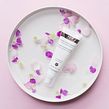

Create your own signature style on social media with personalized settings and color palettes




Color allows us to communicate in a more personal and emotional way. For photographer and stylist Marioly Vázquez, it’s one of the most impactful elements of a photo. She runs her own studio, which specializes in creating visual stories for brands, and has worked with companies including Adobe, Dyson, Ford, and Dior.
In this course, she teaches you how to design presets in your own style and achieve a consistent aesthetic across your platforms. Discover how to edit photos using Lightroom for mobile and transform your perception of the world.
This is Marioly’s second course with Domestika. In her first, Visual Storytelling for Your Personal Brand on Instagram, she gives you the tools you need to create an attractive and appealing narrative on social media.
What will you learn in this online course?
11 lessons & 13 downloads

What's included in this course?
Begin by getting to know Marioly Vázquez, the creative mind behind Maria Marie. She talks through her creative journey to starting her own studio, along with the influences which inspire her as an artist.
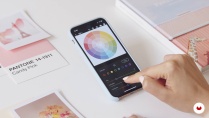
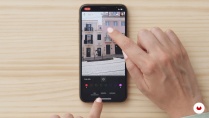
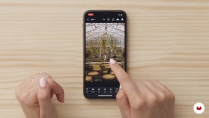
Learn what a preset is and why Lightroom is a great tool for creating them. Then explore the app’s interface and the settings it offers for photo editing, from exposure and contrast to shadows and curves. Discover how to convey different colors and moods through the presets you create.
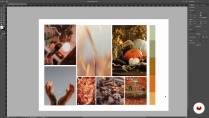
Find inspiration for a mood board that will inspire your preset design, then learn how to make your preset. Marioly shares a shortcut for creating a preset easily, before showing you how to create one for a specific photo and then apply it to multiple images. Practice editing each photo individually for a professional end result, using Marioly’s ‘apply, evaluate, adjust’ method.
Find out how to create a cohesive aesthetic across your feed and stories on Instagram by focusing on your color palette. To finish the course, Marioly shares tips to put into practice while creating your presets, such as considering skin tone and avoiding over-editing.
- 99% positive reviews (74)
- 2,530 students
- 11 lessons (2h 0m)
- 13 additional resources (3 files)
- Online and at your own pace
- Available on the app
- Audio: English
- English · Spanish · Portuguese · German · French · Italian · Polish · Dutch · Turkish · Romanian · Indonesian
- Level: Beginner
- Unlimited access forever
Recommended software & tools for this course
 Adobe Lightroom
What is this course's project?
Design and create a collection of presets based on the seasons of the year.

Projects by course students


Who is this online course for?
This course is for anyone who wants to learn how to edit photos on their mobile phone and achieve a consistent aesthetic across their social media channels.
Requirements and materials
No previous experience is needed to take this course.
You will need a mobile phone with Lightroom installed.

Reviews

Marioly Vázquez
A course by Marioly Vázquez
Marioly Vázquez is a Mexican photographer and stylist who works and lives in London. There, she runs her boutique studio Maria Marie, which specializes in creating visual stories to bring brands to life. As a self-described ‘restless creative’ she has explored a variety of creative disciplines from graphic design and branding, to illustration and poetry. She also has a master’s degree in art management.
Marioly has written and published her own book, Pastel Moods, and hosts workshops to help creatives build a powerful online presence and connect with their audience. She has worked with both start-ups and well-known brands including Dyson, Ford, Issey Miyake, Dior, and Adobe.
Content
-
U1
Introduction
-
About Me
-
Influences
-
-
U2
The Universe of Presets
-
What Is a Preset?
-
Lightroom for Creating Presets
-
Look and Feel of Your Preset 1
-
Look and Feel of Your Preset 2
-
-
U3
How to Create a Preset
-
Mood Board
-
Creating a Preset
-
Applying Our Presets
-
-
U4
Presets And Instagram
-
Color Palette for Instagram
-
Final Tips
-
-
FP
Final project
-
Preset Design: Editing Photos with Lightroom for Mobile
-
What to expect from a Domestika course
-
Learn at your own pace
Enjoy learning from home without a set schedule and with an easy-to-follow method. You set your own pace.
-
Learn from the best professionals
Learn valuable methods and techniques explained by top experts in the creative sector.
-
Meet expert teachers
Each expert teaches what they do best, with clear guidelines, true passion, and professional insight in every lesson.
-
Certificates
PlusIf you're a Plus member, get a custom certificate signed by your teacher for every course. Share it on your portfolio, social media, or wherever you like.
-
Get front-row seats
Videos of the highest quality, so you don't miss a single detail. With unlimited access, you can watch them as many times as you need to perfect your technique.
-
Share knowledge and ideas
Ask questions, request feedback, or offer solutions. Share your learning experience with other students in the community who are as passionate about creativity as you are.
-
Connect with a global creative community
The community is home to millions of people from around the world who are curious and passionate about exploring and expressing their creativity.
-
Watch professionally produced courses
Domestika curates its teacher roster and produces every course in-house to ensure a high-quality online learning experience.
FAQs
Yes, this course is designed for beginners who want to learn photo editing, create presets, and develop a consistent Instagram visual identity using Lightroom Mobile.
You will need a smartphone (iPhone or Android), the Lightroom Mobile app (free or premium), and basic photos to edit. No previous experience or DSLR camera is required.
You’ll learn to create and apply photo presets, build mood boards, use color palettes, edit for a cohesive Instagram feed, and develop a unique visual style using mobile tools.
The course teaches you step-by-step how to design, save, and apply your own presets in Lightroom Mobile for quick, consistent editing across all your photos.
Yes, the course covers strategies for creating a cohesive visual identity, including batch editing, color palettes, and preset application for a unified Instagram aesthetic.
Yes, you’ll learn color theory basics, how to extract and build color palettes, and how to use them to evoke emotion and strengthen your brand’s visual storytelling.
Absolutely. The course covers lighting adjustments, color correction techniques, HSL/HSB controls, and using the Color Mixer to enhance your photos.
 Adobe Lightroom
Explicacion clara, pero poco ejemplificada para mi gusto.
Me gusta mucho la forma en la que explica Marioly. La referencias y como lo hace todo tan sencillo. Excelente curso.
Es todo lo que esperaba, excelente curso. Gracias
Heel erg leuk en leerzaam ;-)
Excelente curso , referencias y recursos!