Digital 3D Lettering with Illustrated Elements
A course by Ana Gomez Bernaus, Visual Artist

Joined December 2021
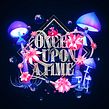



Learn how to combine 3D lettering and illustration to make captivating visual compositions using Photoshop, Illustrator, and Cinema 4D
Joined December 2021

“By merging three-dimensional illustration with lettering, I’m able to build small worlds that tell stories.”
Those worlds have seen visual artist Ana Gomez collaborate with brands like Microsoft and Adobe. She has also won awards from institutions including the Type Directors Club and Lürzer's Archive.
In this online course, Ana teaches you how to create 3D lettering pieces with illustrative elements. Turn your typography ideas into reality using the digital tools of Photoshop, Illustrator, and Cinema 4D. Discover how to mix lettering and illustration to create artwork brimming with detail.
What will you learn in this online course?
13 lessons & 10 downloads


What's included in this course?
Begin the course by getting to know visual artist Ana Gomez. Discover the creative journey that began at art school in Barcelona and led her to work with brands like Microsoft. Then hear about the influences that inspire her.
Learn what makes a good word for a lettering piece based on its sound, musicality, and visual qualities. Next, see how to develop the one you choose into a concept for your illustration by creating a mood board filled with inspiration.
Begin drawing out your word in Photoshop and vectorize it in Illustrator. Then start the modeling process in Cinema 4D. Add light and texture to bring dimension to your piece before rendering it in the correct format, size, and resolution.
Add the finishing touches to your work in Photoshop, tweaking levels, curves, hues, and saturation. To wrap up the course, Ana shares her advice for saving and sharing your illustrated lettering online.
- 100% positive reviews (11)
- 290 students
- 13 lessons (1h 25m)
- 10 additional resources (1 files)
- Online and at your own pace
- Available on the app
- Audio: English
- English · Spanish · Portuguese · German · French · Italian · Polish · Dutch · Turkish · Romanian · Indonesian
- Level: Beginner
- Unlimited access forever
Recommended software & tools for this course
 Adobe Illustrator
 Adobe Photoshop
 Cinema 4D
What is this course's project?
Create a 3D lettering piece consisting of a word or sentence along with striking illustrated elements to enhance your concept.

Who is this online course for?
This course is for anyone with an interest in 3D illustration and lettering, from beginners to artists who are building a portfolio.
Requirements and materials
No previous experience is required.
In terms of materials, you will need access to a device with Photoshop, Illustrator, and Cinema 4D.

Reviews

Ana Gomez Bernaus
A course by Ana Gomez Bernaus
Ana Gomez is a visual artist specializing in 3D. As a child, she loved to draw and wanted to be a painter growing up. She went on to study at design school in Barcelona where, in her final year, she was recommended for a job by her teacher. When her boss took a sabbatical year, she became the leader of the company at just 23 years old. After a few years of working in Barcelona, Ana moved to New York and later Los Angeles where she discovered a passion for 3D.
Since then she has worked on projects including Microsoft Originals, designed several covers for The L. A Times, and has been recognized by institutions like the Type Directors Club, Lürzer's Archive, and more. Ana currently works as an art director at Buck alongside working on freelance lettering-based projects for advertising and editorial clients.
Content
-
U1
Introduction
-
About Me
-
Influences
-
-
U2
First Steps
-
Choosing a Word
-
Mood Board: Conceptual and Visual Development
-
-
U3
Building a 3D Lettering World
-
Starting to Sketch
-
3D Lettering Modeling
-
Modeling the Illustrative Elements 1
-
Modeling the Illustrative Elements 2
-
Lighting and Textures 1
-
Lighting and Textures 2
-
Rendering
-
-
U4
Beauty Pass in Adobe Photoshop
-
Final Touches with Adobe Photoshop
-
Saving and Sharing Your Work
-
-
FP
Final project
-
Digital 3D Lettering with Illustrated Elements
-
What to expect from a Domestika course
-
Learn at your own pace
Enjoy learning from home without a set schedule and with an easy-to-follow method. You set your own pace.
-
Learn from the best professionals
Learn valuable methods and techniques explained by top experts in the creative sector.
-
Meet expert teachers
Each expert teaches what they do best, with clear guidelines, true passion, and professional insight in every lesson.
-
Certificates
PlusIf you're a Plus member, get a custom certificate signed by your teacher for every course. Share it on your portfolio, social media, or wherever you like.
-
Get front-row seats
Videos of the highest quality, so you don't miss a single detail. With unlimited access, you can watch them as many times as you need to perfect your technique.
-
Share knowledge and ideas
Ask questions, request feedback, or offer solutions. Share your learning experience with other students in the community who are as passionate about creativity as you are.
-
Connect with a global creative community
The community is home to millions of people from around the world who are curious and passionate about exploring and expressing their creativity.
-
Watch professionally produced courses
Domestika curates its teacher roster and produces every course in-house to ensure a high-quality online learning experience.
FAQs
Yes, this course is designed for intermediate-level artists who already have some experience with illustration or design tools and want to expand their skills into 3D lettering and modernist design techniques.
You will need Adobe Illustrator, Photoshop, and Cinema 4D for this course, as these are used for sketching, vectorizing, and creating 3D models.
You’ll learn how to conceptualize, sketch, vectorize, and model 3D sculptural lettering, incorporating modernism-inspired techniques, word selection, and organic forms, plus professional post-processing and presentation skills.
Some basic familiarity with Cinema 4D is helpful, but the course covers essential modeling and rendering techniques to get you started with 3D lettering.
The course explores word selection, alliteration, onomatopoeia, and idioms to enhance visual communication and rhythm in your lettering projects.
Yes, the course includes lessons on designing magazine covers, integrating sculptural 3D lettering and illustrative elements for impactful layouts.
Absolutely. The course guides you through creating and refining multiple 3D lettering artworks, helping you build a professional portfolio that reflects your personal style.
 Adobe Illustrator
 Adobe Photoshop
 Cinema 4D
Recomiendo este curso si te interesa seguir aprendiendo nuevas técnicas en composición de lettering en 3D, Ana lo explica de una forma sencilla y da muchos recursos como ejemplos de profesionales para tener ideas.
Es hermoso el trabajo de Ana, aun estoy desarrollando el curso, pero es muy claro y se toma el tiempo para explicar, hasta el momento ha sido facil seguirlo!
Recomendado
Awesome course!
Recomiendo este curso aunque se necesita conocimientos previos de C4D, muy bello el trabajo de Ana
Muito bom