From Sheet to Art: Generate Images with AI from Excel and Make
A course by Daniel Arranz Molinero
, Professional photographer
Professional photographer.
Madrid, Spain.
Joined March 2017
-
-

-


Joined March 2017

Automate AI image generation with Google Sheets, Make, ChatGPT, Stability AI for professional product design visuals
Joined March 2017

Transform any spreadsheet into a creative studio by combining automation, artificial intelligence and cloud tools. In this course, you will learn step by step how to generate images with AI from Excel or Google Sheets using Make, ChatGPT, Stability AI and DALL·E in a fully automated workflow.
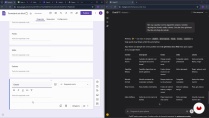
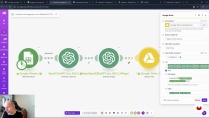
Guided by Daniel Arranz, you will define product concepts, design a structured Google Forms questionnaire and connect it to Google Sheets to build a dynamic database. From there, you will configure scenarios in Make that read each row, send the text to ChatGPT to create optimized prompts, and feed those prompts to image generation models like Stable Diffusion XL, Stable Image Ultra and DALL·E 3.
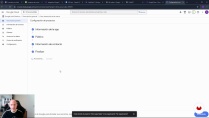
You will also set up Google Drive to automatically store each rendered image, update the status of every record and save the final prompt and image URL in your sheet. Along the way, you will learn how to work with APIs, HTTP modules, Google Cloud Platform credentials and filters in Make so your automations only process pending items.
This course is ideal for designers, content creators, e‑commerce managers, marketers and anyone who wants to scale visual production without advanced programming knowledge. By the end, you will have a complete system for generating product images, marketing visuals and creative assets directly from a simple spreadsheet, ready to adapt to other AI design and automation projects.
What will you learn in this online course?
7 lessons & 2 downloads
- 155 students
- 7 lessons (1h 19m)
- 2 additional resources (1 files)
- Online and at your own pace
- Available on the app
- Audio: Spanish, German, English, French, Indonesian, Italian, Dutch, Polish, Portuguese, Romanian, Turkish
- Spanish · English · Italian · French · German · Portuguese · Polish · Dutch · Indonesian · Romanian · Turkish
- Level: Beginner
- Unlimited access forever
Recommended software & tools for this course
 ChatGPT
 Google Sheets
 Make
MakeWho is this online course for?
People curious about automating image creation through spreadsheets, creatives or marketers managing many visuals, small business owners, designers, and tech enthusiasts seeking practical workflows with Google Sheets, Make, ChatGPT, and Stability AI without advanced coding.
Requirements and materials
No extensive knowledge required basic familiarity with computers web browsing curiosity about automation access to a Google account to use Forms Sheets Drive active accounts on Make OpenAI Stability AI and a stable internet connection
Daniel Arranz Molinero
A course by Daniel Arranz Molinero
Daniel Arranz is an Adobe Photoshop (ACE and ACA) Certified Photo Retouching Specialist and Adobe Photoshop Lightroom Expert. He is the coordinator of the post-production area at the photographic specialization school La Maquinaria, where he carries out extensive work as a photo editing and retouching teacher.
As a photographer, he is an expert in professional lighting, although his specialty is travel and street photography, and his works have obtained more than 40 awards in international competitions such as the Sony World Photography Awards (UK), IPA Awards (USA), Prix de la Photographie (France), International Loupe Awards (Australia), International Color Awards (USA), among others. He has also obtained national awards in El País, National Geographic Spain, Iberia, Eurostars Madrid Tower, and more.
His work has been exhibited in numerous national and international galleries, including the Somerset House in London.
Content
-
From Sheet to Art: Generate Images with AI from Excel and Make
-
Course Overview: From Spreadsheet to AI-Generated Art
-
Designing the Spreadsheet and Form for Automated Image Generation
-
Connecting Google Sheets with Make and ChatGPT
-
Connecting Stability AI and Google Drive in Make
-
Filtering, Debugging, and Upgrading Image Generation with Stability AI
-
Automating Image Creation with ChatGPT in Make
-
Putting Your Automation into Production
-
Final project
-
What to expect from a Domestika course
-
Learn at your own pace
Enjoy learning from home without a set schedule and with an easy-to-follow method. You set your own pace.
-
Learn from the best professionals
Learn valuable methods and techniques explained by top experts in the creative sector.
-
Meet expert teachers
Each expert teaches what they do best, with clear guidelines, true passion, and professional insight in every lesson.
-
Certificates
PlusIf you're a Plus member, get a custom certificate signed by your teacher for every course. Share it on your portfolio, social media, or wherever you like.
-
Get front-row seats
Videos of the highest quality, so you don't miss a single detail. With unlimited access, you can watch them as many times as you need to perfect your technique.
-
Share knowledge and ideas
Ask questions, request feedback, or offer solutions. Share your learning experience with other students in the community who are as passionate about creativity as you are.
-
Connect with a global creative community
The community is home to millions of people from around the world who are curious and passionate about exploring and expressing their creativity.
-
Watch professionally produced courses
Domestika curates its teacher roster and produces every course in-house to ensure a high-quality online learning experience.
FAQs
Domestika courses are online classes that allow you to learn new skills and create incredible projects. All our courses include the opportunity to share your work with other students and/or teachers, creating an active learning community. We offer different formats:
Original Courses: Complete classes that combine videos, texts, and educational materials to complete a specific project from start to finish.
Basics Courses: Specialized training where you master specific software tools step by step.
Specialization Courses: Learning paths with various expert teachers on the same topic, perfect for becoming a specialist by learning from different approaches.
Guided Courses: Practical experiences ideal for directly acquiring specific skills.
Intensive Courses (Deep Dives): New creative processes based on artificial intelligence tools in an accessible format for in-depth and dynamic understanding.
All deep dive courses are 100% online, so once they're published, deep dive courses start and finish whenever you want. You set the pace of the class. You can go back to review what interests you most and skip what you already know, ask questions, answer questions, share your projects, and more.
The deep dive courses are divided into different modules. Each one includes lessons, informational text, tasks, and practice exercises to help you carry out your project step by step, with additional complementary resources and downloads. You'll also have access to an exclusive forum where you can interact with other students, as well as share your work and your final project, creating a community around the deep dive courses.
You can redeem the deep dive courses you received by accessing the redeeming page and entering your gift code.
 ChatGPT
 Google Sheets