Create Motion Posters with AI for Instagram and TikTok
A course by Daniel Arranz Molinero
, Professional photographer
Professional photographer.
Madrid, Spain.
Joined March 2017
-
-
-


Joined March 2017

Create cinematic motion posters with AI for Instagram and TikTok using ChatGPT, Photoshop, VEO3, Camtasia, GIF export
Joined March 2017

Learn to create cinematic motion posters that loop cleanly on Instagram and TikTok using AI, video editing and animation tools.
You’ll shape your visual idea with ChatGPT, write prompts that actually stay consistent, and generate your first poster drafts in Nano Banana Pro. Then you’ll take them into Adobe Photoshop to clean up logos, reframe everything to 9:16 and prepare distortion‑free frames for animation.
In VEO3 you’ll bring the poster to life by adjusting movement, particles and light so the first and last frame line up for an 8‑second seamless loop. After that, you’ll put together a text mockup, design a simple photo‑and‑motion‑themed logo, choose typography and build overlay templates with guides and margins you can reuse.
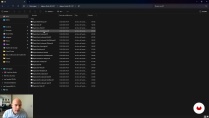
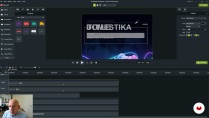
To wrap up, you’ll assemble everything in Camtasia, adapt it to 9:16, 4:5 and 1:1 for stories, reels and feed, and export versions tuned for social platforms. You’ll also learn how to make animated GIFs in Filmora and EZGIF, then fine‑tune them in Photoshop with layered edits, color tweaks and small graphic touches for web and email use.
What will you learn in this online course?
5 lessons & 2 downloads
- 100% positive reviews (1)
- 77 students
- 5 lessons (1h 11m)
- 2 additional resources (1 files)
- Online and at your own pace
- Available on the app
- Audio: Spanish, German, English, French, Italian, Polish, Portuguese, Turkish
- Spanish · English · Portuguese · French · German · Polish · Italian · Turkish
- Level: Beginner
- Unlimited access forever
Recommended software & tools for this course
 Adobe Photoshop
 Camtasia
 ChatGPT
 Ezgif
Ezgif Filmora
 Nano Banana
 Veo3
Veo3Who is this online course for?
People who want to make better motion posters for Instagram, TikTok or other platforms. That includes creators, graphic and motion designers curious about using AI, plus photographers, videographers, digital marketers, social media managers and anyone with basic image‑editing skills who wants a clear, practical workflow.
Requirements and materials
You don’t need a big background for this. Being comfortable on a computer, knowing your way around simple photo or video editors, and having access to tools like ChatGPT, Nano Banana Pro, Photoshop, VEO3, Camtasia, Filmora, or EZGIF is enough. If you already know common social formats like 9:16, 4:5, or 1:1, things move a bit faster.
Reviews
Daniel Arranz Molinero
A course by Daniel Arranz Molinero
Daniel Arranz is an Adobe Photoshop (ACE and ACA) Certified Photo Retouching Specialist and Adobe Photoshop Lightroom Expert. He is the coordinator of the post-production area at the photographic specialization school La Maquinaria, where he carries out extensive work as a photo editing and retouching teacher.
As a photographer, he is an expert in professional lighting, although his specialty is travel and street photography, and his works have obtained more than 40 awards in international competitions such as the Sony World Photography Awards (UK), IPA Awards (USA), Prix de la Photographie (France), International Loupe Awards (Australia), International Color Awards (USA), among others. He has also obtained national awards in El País, National Geographic Spain, Iberia, Eurostars Madrid Tower, and more.
His work has been exhibited in numerous national and international galleries, including the Somerset House in London.
Content
-
Create Motion Posters with AI for Instagram and TikTok
-
From idea to image: using ChatGPT prompts, Nano Banana Pro, and 9:16 prep in Photoshop
-
VEO3 animation and loop check
-
Editorial mockup, logo, typography, and overlay templates
-
Final assembly in Camtasia: texts, logo, export, and horizontal version
-
Exporting a GIF with Filmora, EZGIF, and Photoshop
-
Final project
-
What to expect from a Domestika course
-
Learn at your own pace
Enjoy learning from home without a set schedule and with an easy-to-follow method. You set your own pace.
-
Learn from the best professionals
Learn valuable methods and techniques explained by top experts in the creative sector.
-
Meet expert teachers
Each expert teaches what they do best, with clear guidelines, true passion, and professional insight in every lesson.
-
Certificates
PlusIf you're a Plus member, get a custom certificate signed by your teacher for every course. Share it on your portfolio, social media, or wherever you like.
-
Get front-row seats
Videos of the highest quality, so you don't miss a single detail. With unlimited access, you can watch them as many times as you need to perfect your technique.
-
Share knowledge and ideas
Ask questions, request feedback, or offer solutions. Share your learning experience with other students in the community who are as passionate about creativity as you are.
-
Connect with a global creative community
The community is home to millions of people from around the world who are curious and passionate about exploring and expressing their creativity.
-
Watch professionally produced courses
Domestika curates its teacher roster and produces every course in-house to ensure a high-quality online learning experience.
FAQs
Domestika courses are online classes that allow you to learn new skills and create incredible projects. All our courses include the opportunity to share your work with other students and/or teachers, creating an active learning community. We offer different formats:
Original Courses: Complete classes that combine videos, texts, and educational materials to complete a specific project from start to finish.
Basics Courses: Specialized training where you master specific software tools step by step.
Specialization Courses: Learning paths with various expert teachers on the same topic, perfect for becoming a specialist by learning from different approaches.
Guided Courses: Practical experiences ideal for directly acquiring specific skills.
Intensive Courses (Deep Dives): New creative processes based on artificial intelligence tools in an accessible format for in-depth and dynamic understanding.
All deep dive courses are 100% online, so once they're published, deep dive courses start and finish whenever you want. You set the pace of the class. You can go back to review what interests you most and skip what you already know, ask questions, answer questions, share your projects, and more.
The deep dive courses are divided into different modules. Each one includes lessons, informational text, tasks, and practice exercises to help you carry out your project step by step, with additional complementary resources and downloads. You'll also have access to an exclusive forum where you can interact with other students, as well as share your work and your final project, creating a community around the deep dive courses.
You can redeem the deep dive courses you received by accessing the redeeming page and entering your gift code.
 Adobe Photoshop
 Camtasia
 ChatGPT
 Ezgif
Ezgif Nano Banana
 Veo3
Veo3
excelente