Vector Portrait with Manual Textures
A course by Alvaro Tapia Hidalgo, Graphic Designer and Illustrator

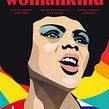

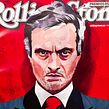

Create unique illustrations by combining digital images with handmade textures

Any work of art you envision can become a reality when you tap into the power of both analog and digital techniques and throw in a bit of experimentation.
Álvaro Tapia Hidalgo has spent over seven years doing just this, illustrating unique and inimitable vector portraits that overflow with meaning and emotion. His work has led to collaborations with renowned publications such as The New Yorker, Rolling Stone, The Washington Post, The Atlantic, ESPN, WIRED, and Newsweek, as well as big-name brands like adidas, PUMA, and Heineken.
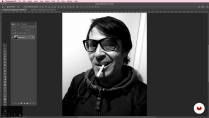
In this course, join him to learn to create an illustrated portrait by applying both digital and analog techniques. Álvaro teaches you all the steps involved in putting together an illustration based on a photo reference using vector drawings in Adobe Illustrator along with handmade textures and layers in Adobe Photoshop.
What will you learn in this online course?
14 lessons & 15 downloads
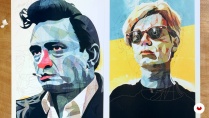
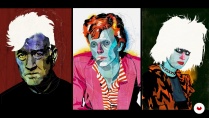
What's included in this course?
Begin by familiarizing yourself with Álvaro's work, both his commercial commissions and his personal projects, as he describes how he got his start in the world of illustration and reveals some of his greatest influences.
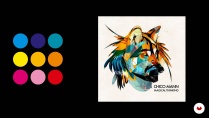
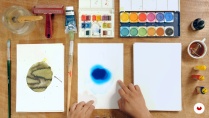
Prepare to tackle your project by exploring his approach to portraiture, the criteria he applies for choosing a reference image, and his method for putting together a striking color palette. Experiment freely with watercolor and ink to create handmade textures you can later digitize and apply to your portrait.
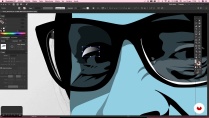
Álvaro then teaches you how to create a vector illustration by tracing over a photo reference digitally in Adobe Illustrator, how to modify key elements, and how to apply a color base.
Next, transfer your vector portrait to Adobe Photoshop to work on it in layers, adding the backgrounds and textures you painted earlier.
Enhance your illustration by refining the details and adding the final touches to achieve a stylized piece with a powerful aesthetic.
Once you've finished your texturized vector portrait, Álvaro teaches you how to polish it even further with go-to professional techniques. To wrap things up, he reveals some tips and methods to help you unleash your creativity and infuse your artwork with character and expressiveness.
- 100% positive reviews (152)
- 2,542 students
- 14 lessons (1h 46m)
- 15 additional resources (8 files)
- Online and at your own pace
- Available on the app
- Audio: Spanish
- Spanish · English · Portuguese · German · French · Italian · Polish · Dutch · Turkish · Romanian · Indonesian
- Level: Beginner
- Unlimited access forever
Recommended software & tools for this course
 Adobe Illustrator
 Adobe Photoshop
What is this course's project?
Create an illustrated portrait of yourself or any other person you choose by combining vector drawings made in Adobe Illustrator with hand-painted watercolor textures and later assembling the final composition using layers in Adobe Photoshop.

Projects by course students


Who is this online course for?
Designers, illustrators, and all art lovers who want to explore new ways to create illustrated portraits with mixed media.
Requirements and materials
You don't need any prior drawing experience; Álvaro teaches you a foolproof method you can use to develop your illustrated portrait using a photo reference. However, you do need basic knowledge of Adobe Illustrator and Photoshop.
As for materials, you need a computer with Adobe Illustrator and Photoshop installed, brushes, paper, watercolor, ink, a roller, and a scanner.

Reviews

Alvaro Tapia Hidalgo
A course by Alvaro Tapia Hidalgo
Álvaro Tapia Hidalgo is a graphic designer and illustrator from Viña del Mar, Chile with a degree in design from La Universidad de Valparaíso and another one in film from La Escuela de Cine de Chile.
He spent over a decade working on graphic-design projects as an art director while also tackling audiovisual projects as a film director and post-production specialist. In 2011, he decided to focus exclusively on illustration, combining traditional and digital techniques to achieve his own distinctive style.
His work has been featured in international publications such as The New Yorker, ESPN, Rolling Stone, Billboard, Newsweek, The Atlantic, and New York Magazine, and he has also collaborated with top brands like adidas, PUMA, Heineken, Mahindra, Atomic, and Marc Ecko. Additionally, his work has been displayed in a number of exhibitions, galleries, and museums in countries all over the world, including the United States, Germany, England, Italy, the Netherlands, Colombia, Croatia, Argentina, Spain, and Chile.
Content
-
U1
Introduction
-
Presentation
-
Influences
-
What will we do in this course?
-
-
U2
The portrait: Previous processes
-
My vision of the portrait
-
Preparation of the reference image
-
Color
-
Textures
-
-
U3
To portray!
-
Traced in Illustrator (part 1)
-
Traced in Illustrator (part 2)
-
Photoshop composition
-
Background
-
Finish
-
-
U4
Resources
-
Additional features
-
Product Application
-
-
FP
Final project
-
Vector portrait with manual textures
-
What to expect from a Domestika course
-
Learn at your own pace
Enjoy learning from home without a set schedule and with an easy-to-follow method. You set your own pace.
-
Learn from the best professionals
Learn valuable methods and techniques explained by top experts in the creative sector.
-
Meet expert teachers
Each expert teaches what they do best, with clear guidelines, true passion, and professional insight in every lesson.
-
Certificates
PlusIf you're a Plus member, get a custom certificate signed by your teacher for every course. Share it on your portfolio, social media, or wherever you like.
-
Get front-row seats
Videos of the highest quality, so you don't miss a single detail. With unlimited access, you can watch them as many times as you need to perfect your technique.
-
Share knowledge and ideas
Ask questions, request feedback, or offer solutions. Share your learning experience with other students in the community who are as passionate about creativity as you are.
-
Connect with a global creative community
The community is home to millions of people from around the world who are curious and passionate about exploring and expressing their creativity.
-
Watch professionally produced courses
Domestika curates its teacher roster and produces every course in-house to ensure a high-quality online learning experience.
FAQs
You’ll learn to create vector portraits by blending digital drawing with handmade textures, incorporating watercolor and ink into your artwork, preparing reference images, and applying color, composition, and post-production techniques to achieve expressive, professional results.
This course is aimed at people with intermediate skills in illustration or graphic design and basic knowledge of Photoshop and Illustrator. Drawing skills aren’t required, but some experience with digital editing software is recommended.
You’ll need a computer with Photoshop and Illustrator installed, a scanner or camera to digitize textures, paper, watercolors, India ink, and optionally a graphics tablet. Internet access is essential to follow lessons and download resources.
Textures are created using manual techniques like watercolor or ink, then digitized via scanner or camera and integrated into the illustration using layers and blending modes in Photoshop or Illustrator, resulting in an organic, unique finish.
The course teaches how to combine digital drawing with handmade textures, apply collage techniques, adjust colors and contrast, manipulate layers, and use vector tracing tools alongside painterly and editorial composition methods.
Yes, you’ll learn to choose and adapt color palettes, use saturated or limited colors, apply contrast, and justify your color choices based on the portrait’s concept and visual story.
By the end, you’ll be able to create original vector portraits with handmade textures, blend different techniques and media, master digital composition, and adapt your illustrations to various editorial and commercial formats.
 Adobe Illustrator
 Adobe Photoshop
Très bon cours, merci.
Great course! I've been able to digitize photos and give them completely new life. Spending time doing this digitizing yourself creates a much sharper product, one that is quite artistic in the choices you need to make, and you see the person or animal in a new way. One of the best courses.
Very nice and modern technique. And the artist explains his technique well.
Techniques I have never thought of before much less done. Looking forward to years of experimentation.
Il corso mi ha offerto un ottimo spunto per una rielaborazione grafica delle mie foto. Un graditissimo approfondimento dei software Adobe.