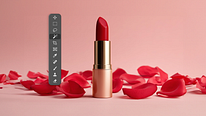
Guided Course: Learn to Edit and Perfect Product Photos in Photoshop
Course final project
A guided course by Xi Chen, Photo Retoucher



About the final project for: Guided Course: Learn to Edit and Perfect Product Photos in Photoshop
Guided Course: Learn to Adjust and Perfect Product Photos in Photoshop
“Every product photo tells a story about quality, detail, and brand identity—and in this project, you’ll learn how to bring that story to life through retouching. Working step by step, you’ll refine a still-life product image using Photoshop, applying professional techniques that ensure your photo looks clean, vibrant, and ready to shine in any context. No need to feel overwhelmed: the process is broken down into clear stages that will guide you from raw capture to a finished, professional result. 1. Perfect the Setup from the Start Begin by arranging your Photoshop workspace and importing a RAW file. This ensures maximum flexibility and image quality before any edits take place. Example project: Open a RAW photo of a cosmetic bottle and prepare the file for non-destructive editing. 2. Plan Your Workflow Like a Professional Before retouching, take time to analyze the photo: what stands out, what needs fixing, and what story should the final image tell? This step trains your eye to make purposeful decisions. Example project: Assess a jewelry photo to identify dust spots, lighting inconsistencies, and areas that could benefit from stronger highlights. 3. Use Masking for Precision Apply masks to isolate areas of the product or background. This lets you make adjustments without affecting the entire image and ensures a controlled, polished result. Example project: Mask the label on a perfume bottle to adjust contrast and clarity without altering the glass. 4. Clean and Refine the Details Remove imperfections such as dust, scratches, or unwanted reflections. Subtle but careful cleanup adds credibility and elevates the overall professionalism of the shot. Example project: Clean up small particles around a lipstick tube while preserving natural texture. 5. Balance and Harmonize Colors Adjust tones to achieve a cohesive, true-to-life color palette that highlights the product without oversaturation. This step ensures the final photo feels consistent and visually appealing. Example project: Correct the color balance of a skincare jar to remove yellowish lighting and achieve a neutral, elegant look. This is not only about polishing a product photo—it’s about training your eye to see details that make an image feel professional and brand-ready. By the end, you’ll have developed a workflow that is efficient, precise, and repeatable for any still-life or product photography project. Think of your final result as more than just a photo: it’s a crafted image that conveys trust, quality, and style. Once you’ve completed your retouch, share it with others—you might be surprised at how much your polished work can inspire confidence and creativity in your audience.”
Course summary for: Guided Course: Learn to Edit and Perfect Product Photos in Photoshop
-
Category
Photography & Video -
Software
Adobe Photoshop -
Areas
Digital Photography, Fashion Photography, Photography Post-production, Portrait Photography

Xi Chen
A guided course by Xi Chen
Xi Chen is a freelance photo retoucher based in Brooklyn, New York. Originally a photographer, she now specializes in color correction and retouching images for fashion editorials, portraits, commercial campaigns, social media content, and fine art.
Xi has worked with luxury fashion brands like Chanel, Prada, Alexander Wang, Balenciaga, Calvin Klein, Hermes, Valentino, Bobbi Brown, Vera Wang, and more. Her client list also includes Google, Samsung, Nike, and Adidas, as well as editorials like GQ, Harper’s Bazaar, Vanity Fair, and Vogue.
- 63 students
- 9 lessons (1h 22m)
- 8 additional resources (2 files)
- Online and at your own pace
- Available on the app
- Audio: English, German, Spanish (Latam), French, Italian, Polish, Portuguese, Turkish
- Romanian · Indonesian · English · Portuguese · French · Italian · German · Turkish · Dutch · Polish
- Level: Beginner
- Unlimited access forever
Recommended software & tools for this course
 Adobe Photoshop
Category
Areas